
How to Set Up Stripe Subscriptions in 2026: The Complete SaaS Guide
Mastering automated billing, global tax compliance, and revenue recovery with Stripe's 2026 updates.
FINTECH
2/22/20263 min read
Setting up Stripe subscriptions in 2026 is no longer just about placing a "Buy" button on a page. As the SaaS landscape evolves, founders need systems that handle global tax compliance, automated revenue recovery, and complex billing logic without constant manual intervention.
If you’re looking to scale your recurring revenue, here is the definitive guide on how to set up Stripe subscriptions for maximum efficiency and growth.
1. Define Your Product Architecture
Before touching any code, you must structure your offerings within the Stripe Dashboard. In 2026, Stripe’s catalog is the "source of truth" for your billing logic.
Products vs. Prices: Create a Product for each service level (e.g., Basic, Pro, Enterprise). Within each product, create multiple Prices for different intervals (Monthly vs. Yearly).
The Power of Metadata: Use metadata tags on your products. This helps your app identify features to "unlock" once a subscription is active without needing to hard-code product IDs everywhere.
2. Choose the Right Integration Method
Stripe offers two primary paths for 2026, depending on your technical resources and desired user experience.
Stripe Checkout (Low-Code/High Conversion)
This is a Stripe-hosted payment page that redirects users to a secure environment.
Pros: Automatically handles 3D Secure, Apple/Google Pay, and localized payment methods like iDEAL or SEPA.
2026 Update: It now includes AI-driven upsells, suggesting yearly plans to users based on their behavior patterns.
Stripe Elements & Embedded Checkout (Full Control)
For a seamless brand experience, use Embedded Checkout. The payment form lives directly on your site, keeping the user in your ecosystem.
Best for: Established SaaS companies that want total control over the UI/UX while remaining PCI compliant.
3. The Implementation Workflow
To successfully set up Stripe subscriptions, your backend needs to follow a specific "handshake" process:
Create a Customer: Never process a payment without creating a Customer object first. This allows you to track billing history and save payment methods for future renewals.
Initialize the Subscription: Link the Customer ID to a Price ID. Stripe will then attempt to charge the default payment method.
Handle the "Provisioning": Once the initial payment is successful, your app must update the user's status to "Active."
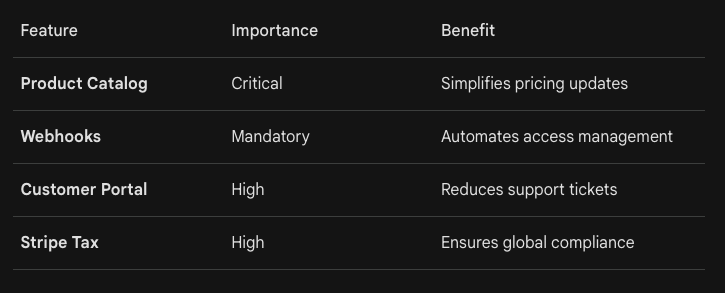
4. Why Webhooks are Non-Negotiable
The biggest mistake founders make is ignoring Webhooks. A subscription is a living entity, it can renew, fail, or be canceled at any time. Your server needs to "listen" for these events:
invoice.paid: The most important event. Use this to extend user access for another month.
invoice.payment_failed: Trigger an automated "Dunning" email or a grace period.
customer.subscription.deleted: Instantly revoke access when a subscription ends.
5. Advanced 2026 Features to Consider
To future-proof your SaaS, implement these modern billing strategies:
Usage-Based Billing: Charge for what users actually use (e.g., seats, gigabytes, or API calls) using Stripe’s Metered Billing engine.
The Customer Portal: Stop building "billing settings" pages. Use the Stripe Customer Portal to let users manage their own upgrades and cancellations via a secure, hosted link.
Stripe Tax: In 2026, global tax laws are stricter than ever. Enable Stripe Tax to automatically calculate VAT, GST, and Sales Tax based on the customer's location.
Summary: Fast-Track Your Launch
Setting up a robust payment system is the foundation of any successful SaaS. While the API is powerful, it can be time-consuming to get every detail, from webhooks to tax, perfectly aligned.
If you want to bypass the learning curve and go live in days, Fynteq specializes in expert Stripe and PayPal integrations. With 10+ years of payment experience, we provide fixed-price packages starting at €299 to get your subscription engine running perfectly.
Would you like me to provide a sample Node.js code snippet for handling the invoice.paid webhook specifically?
Hours
Mon-Fri 9am - 6pm
Contacts
info@fynteq.com
About:
Expert fintech consulting and strategy services, backed by 10+ years of experience in Payment and crypto industries.